FREE tools

How to Format Your Text With Markdown Quotes
Lukas Fuchs vor 7 Monaten Webdesign & UX 3 Min. Lesezeit
markdown quotes

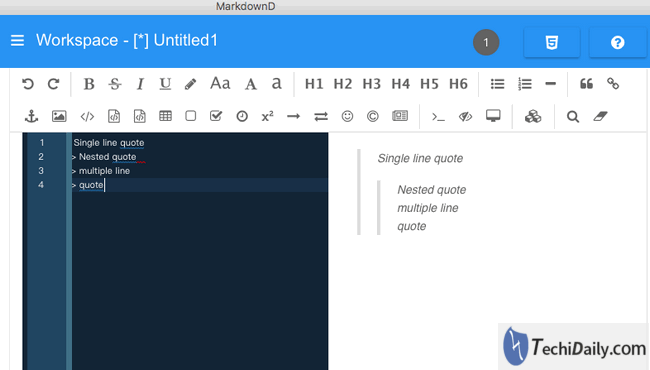
If you're using Markdown for writing your blog posts or web pages, you'll likely want to know how to format your text properly with markdown quotes. Adding quotes to your text is simple. To do this, add a'before the line of text. For example, in the following sentence, you can place '[Author:]' before the quote. If you want to make the quote appear in bold, you can surround it with backticks.

You'll be able to read any Markdown document, since the syntax is simple. It's designed to be easy to read by non-technical users, including bloggers who work with content management systems. Even techies use Markdown to write simple texts. In fact, some programmers use it for their supporting documents. This way, the code is not converted to HTML but remains easily readable. You can create PDFs from Markdown text, and even print books from it.

To format an HTML article with Markdown, you'll need to know how to use anchor tags. You can use a hyperlink in an anchor tag, and you can also use an ampersand in the title. Note that indenting a paragraph with a '#' character is unnecessary. Using anchors in HTML is a great way to make your writing look better. Just be sure to include a title attribute for each image.

Aside from the '#' character in the HTML blockquote element, you can also use an '*' to denote a link. Markdown syntax is easier to read and easier to use. Markdown also has several built-in extensions, such as GitLab Flavored Markdown for GitLab's documentation website rendering engine. You can also use Ghost to create Markdown documents. But don't forget to check the markdown documentation's help page for additional information.

Weitere Beiträge

Folge uns

Neue Beiträge

Performance & SEO

Top SEO Tools for Boosting Website Visibility: Die besten Tools, um mehr Sichtbarkeit zu bekommen

AUTOR • Nov 26, 2026
Webdesign & UX

Outlook Kalender Freigabe anfordern: So bekommst du Zugriff ohne Chaos

AUTOR • Nov 24, 2026
Webdesign & UX

Formular ausfüllen in Word: So machst du digitale Formulare sauber, schnell und professionell

AUTOR • Nov 24, 2026
Performance & SEO

Abkürzung AMP: Was sie bedeutet, wann du sie nutzt und wie du sie richtig einsetzt

AUTOR • Nov 21, 2026
APIs & Microservices

How to Generate an API Key for Your WordPress Website: Step-by-Step, Fast, and Safe

AUTOR • Nov 21, 2026
Webdesign & UX

Relativer Bezug in Excel: So sparst du Zeit und vermeidest Formel-Fehler

AUTOR • Nov 21, 2026
Webdesign & UX

Excel Menüband einblenden: So blendest du das Menüband in Sekunden wieder ein

AUTOR • Nov 21, 2026
Webdesign & UX

Outlook Symbol Übersicht: Alle wichtigen Symbole in Outlook schnell verstehen

AUTOR • Nov 19, 2026
APIs & Microservices

Home Assistant Token: So findest, nutzt und schützt du deinen Zugriff richtig

AUTOR • Nov 18, 2026
Datenbanken & ORM

PostgreSQL CROSS JOIN verstehen und richtig nutzen: So erzeugst du jede Kombination

AUTOR • Nov 18, 2026
Webdesign & UX

Email Encoder: So schützt du E-Mail-Adressen vor Spam, Scraping und Missbrauch

AUTOR • Nov 18, 2026
Frontend-Entwicklung

Flachbandkabel Stecker öffnen: So löst du FFC- und ZIF-Stecker ohne Schaden

AUTOR • Nov 18, 2026
Webdesign & UX

Fully Kiosk Browser mit Home Assistant auf Deutsch einrichten: So machst du aus jedem Tablet ein smartes Display

AUTOR • Nov 17, 2026
Datenbanken & ORM

Update Join: So funktioniert das SQL JOIN-Update ohne Chaos

AUTOR • Nov 17, 2026
Webdesign & UX

Excel wenn Farbe Wert: So prüfst du Zellfarben und gibst Werte gezielt aus

AUTOR • Nov 15, 2026
Datenbanken & ORM

Postgres nicht gleich: Warum PostgreSQL nicht einfach „nur eine Datenbank“ ist

AUTOR • Nov 14, 2026
Webdesign & UX

Outlook Übermittlungsfehler löschen: So bekommst du den Fehler schnell weg

AUTOR • Nov 13, 2026
Webdesign & UX

Plotter herstellen: So baust du einen Plotter selbst, der wirklich funktioniert

AUTOR • Nov 13, 2026
Full-Stack

Scatterplot R erstellen: So visualisierst du Daten schnell, klar und sauber

AUTOR • Nov 13, 2026
Backend-Entwicklung

First Principles oder Logic: So triffst du bessere Entscheidungen mit klarem Denken

AUTOR • Nov 13, 2026

Beliebte Beiträge

Webdesign & UX

Marketingportal: Das Herzstück Ihrer Markenkommunikation

AUTOR • Apr 12, 2026
Datenbanken & ORM

Python: Float zu Int konvertieren – So klappt es problemlos

AUTOR • Jul 02, 2025
Full-Stack

Alles, was du über Teamspeak 5 Server wissen musst: Aufbau, Vorteile und Tipps

AUTOR • Jun 29, 2025
Webdesign & UX

Die ultimative Anleitung: Wie man einen Screenshot macht

AUTOR • Jun 20, 2025
Webdesign & UX

Effektiv mit Excel: Uhrzeiten berechnen leicht gemacht

AUTOR • Jun 15, 2025
Frontend-Entwicklung

How to Make Bullet Points in Markdown: Einfach, schnell und sauber formatiert

AUTOR • Jun 29, 2026
Backend-Entwicklung

How to Remove the Player Location Check Plugin

AUTOR • Apr 23, 2026
Webdesign & UX

How to Format Your Text With Markdown Quotes

AUTOR • Apr 23, 2026
Webdesign & UX

Copyright-Symbol auf dem Mac: So fügen Sie es einfach ein

AUTOR • Jul 16, 2025
Performance & SEO

Clipchamp für Windows 11: Die beste Video-Editing-Software im Test

AUTOR • Jul 03, 2025
Performance & SEO

XLOOKUP in Excel: Der ultimative Führer für effiziente Datenanalysen

AUTOR • Jul 01, 2025
Full-Stack

Der finale Code: Wie er die Softwareentwicklung revolutioniert

AUTOR • Jul 01, 2025
Webdesign & UX

So löschen Sie Seite 2 in Word: Eine Schritt-für-Schritt-Anleitung

AUTOR • Jun 27, 2025
Backend-Entwicklung

Interface-Diagramm in UML: Ein Leitfaden zur Modellierung von Systemen

AUTOR • Jun 27, 2025
Performance & SEO

Excel: So nutzst du mehrere WENN-Funktionen effektiv

AUTOR • Jun 26, 2025
Backend-Entwicklung

Debug Bedeutung: Was Sie wissen sollten

AUTOR • Jun 26, 2025
Frontend-Entwicklung

Browser schließen: So beendest du Tabs, Prozesse und Speicherfresser richtig

AUTOR • Jun 19, 2026
Webdesign & UX

Die besten kostenlosen Apps zum Bild-in-Bild Einfügen für kreative Projekte

AUTOR • Jun 14, 2025
Frontend-Entwicklung

How to Fix a "F.TXT Js" Problem

AUTOR • Apr 23, 2026
APIs & Microservices

Alle Funktionen des WICK Dashboards: Ein umfassender Überblick

AUTOR • Jul 28, 2025